Tempesta Technologies
  • Home
  • Tempesta FW
    • Features
      • Web acceleration
      • Load balancing
      • Application performance monitoring
    • Performance
    • How it works
    • Deployment
    • Support
    • Knowledge base
  • Services
    • Software development
      • High performance
      • Networking
      • Databases
      • Linux kernel
      • Machine learning
      • How we work
      • Case studies
    • Performance analysis
    • Network security
      • DDoS protection
      • Application security
      • Cryptography
      • Security assessment
      • How we work
      • Case Studies
  • Solutions
    • DDoS Protection
    • Web Acceleration
  • Blog
  • Company
    • Research
    • Careers
    • Contact
Tempesta Technologies

Troubleshooting System Description

Goals🔗

The goal of the troubleshooting system is to catch crashes, errors, bugs, and other issues on the client side, and to notify the Tempesta FW (TFW) developers about server problems and critical situations. It provides detailed information about each incident, enabling the team to react as quickly as possible.

The data sent by the client includes:

  • A dmesg report captured at the time of the incident

  • General server information (OS version, machine details, hardware specs, and loaded kernel modules)

The data is securely transmitted from the client to the TFW Support Server using TLS encryption. At the destination, the data is stored as an encrypted archive both:

  • as a backup on the TFW server, and

  • as an attachment to a Slack message sent to the development team.

Since the archive containing the incident log is encrypted, only the TFW team has access to the details.

Architecture🔗

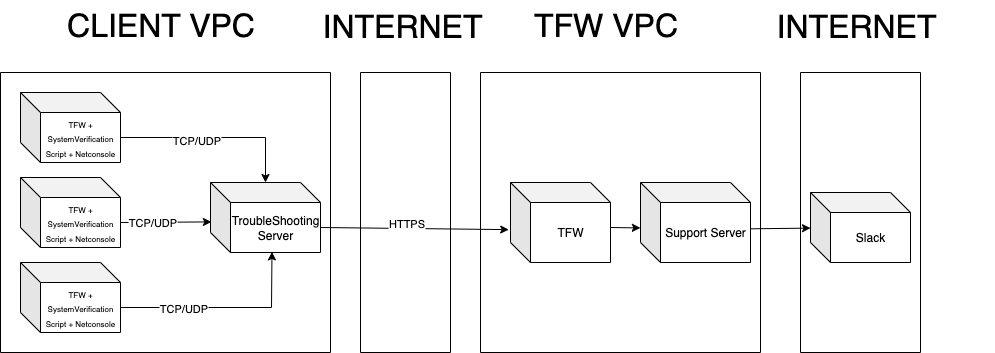
The system consists of three main components:

Name Description
System Verification Script Integrated into the Tempesta start CLI (also available as a standalone script). Checks system compatibility, configures Netconsole, and sends machine details.
Troubleshooting Server Collects dmesg logs from multiple servers, analyzes them, and forwards incident data to the Tempesta Support Server.
Support Server Receives logs from client servers and notifies the TFW Team about the incident.

The diagram below illustrates a typical communication flow between the servers:
  • Home
  • XFW
    • Basic Administration
    • Quick start
    • DNS DDoS protection
    • Observability
    • Performance
  • XFW Filtration Rules
    • Chaining
    • Evaluation Mode
    • IP Filter
    • ICMP Filter
    • DNS Filter
    • UDP Anomaly Filter
    • TCP Anomaly Filter
    • TCP Authentication Filter
    • TCP SYN Cookies
    • TCP Flags Filter
    • Destination Filter
    • Source Filter
    • Protected Network Definition
    • Rate Limits
    • Default Rules
  • Manager
    • Management daemon
    • Client library
    • Command line interface
  • DDoS Protection Use Cases
    • DNS server
    • Web server
    • Advanced Protection
  • Troubleshooting
    • Troubleshooting System Description
    • Troubleshooting System Verification Script
    • Troubleshooting Netconsole Configuration
    • Troubleshooting Server
    • Troubleshooting Support Server

Powered by Tempesta FW

Stay up to date with our latest developments

Useful Links

Home
Blog

Tempesta® FW

Features
Performance
Deployment
Support
Knowledge Base

Services

Software Development
Performance analysis
Network Security

Solutions

DDoS Protection

Web Acceleration

Company

Research
Careers
Contact