
XFW
Tempesta xFW is an XDP module for volumetric DDoS protection.
While Tempesta FW handles application-level (L7) DDoS attacks, Tempesta xFW is responsible for filtering network-layer (L3-L4) attacks. For example, an HTTP flood is handled by Tempesta FW, whereas a SYN flood or an amplification attack are mitigated by Tempesta xFW.
Modes of Operation🔗
There are two primary deployment scenarios for Tempesta xFW: local host protection and network protection.
Both scenarios can operate in real (default) or evaluation mode.
In all configurations, you must define normal traffic profiles, including TCP/UDP ports, ICMP traffic and the expected traffic volume (in bytes per second, BPS, and/or IP packets per second, PPS).
Local host protection🔗
This mode is useful when building a multi-layer (L3-L7) filtration edge, such as a CDN edge, on-premises ADC (Application Delivery Controller) or authoritative or recursive DNS service.
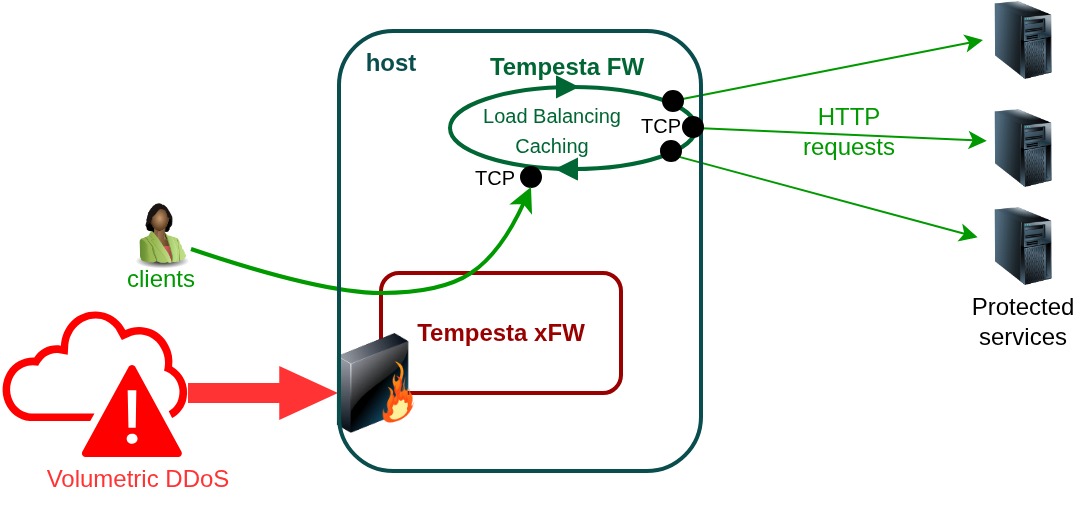
In this scenario Tempesta xFW protects the local host from DDoS attacks targeting its IP address(es).
While this mode works for both DNS and TCP servers, the main difference between host and gateway modes lies in how they handle TCP traffic. The local host operates as a TCP connection endpoint (proxy): network clients establish TCP connections with the host and the host manges its own connections with all protected backend servers.
In combination with Tempesta FW and Tempesta WebShield, you can accelerate and protect your web service from volumetric and application-layer DDoS attacks, as well as malicious bots.
Typically, in this configuration, an application layer, such as Tempesta FW, is responsible for traffic distribution among the protected services.
Network protection🔗
In this setup, the Linux server is configured as a router that forwards traffic at the IP layer. Tempesta xFW filters attacks targeting IP addresses routed through the host.
Similar to host mode, in this configuration the Tempesta xFW gate must receive all ingress traffic, from clients to the protected servers, as well as egress traffic, from the servers back to the clients.
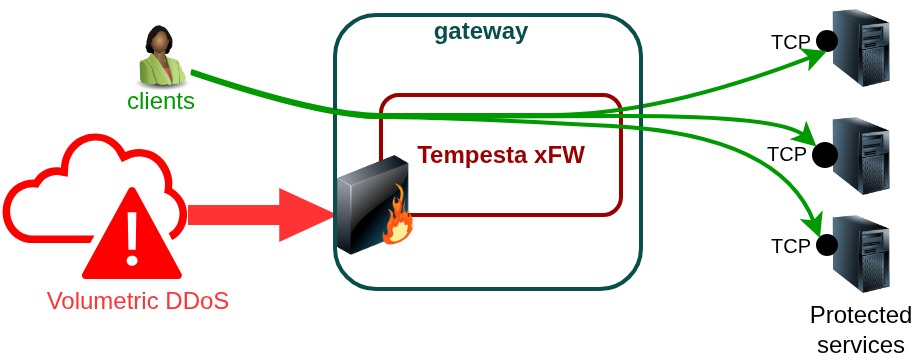
In this mode, Linux operates as a regular router, so you must set the following
sysctl parameters:
net.ipv4.ip_forward=1
net.ipv6.conf.all.forwarding=1
You also need to define your routing table, configure network interfaces, and adjust firewall rules.
Evaluation mode🔗
Evaluation mode can be enabled together with any of the previously described modes. In this mode, the system collects statistics on IP addresses that would otherwise be blocked, but no actual traffic blocking is performed.
This mode provides a safe way to assess system behavior and effectiveness under a given workload profile, and to estimate the potential reduction in server load that could be achieved with full blocking enabled.
Device modes🔗
Tempesta xFW supports native (default) and skb XDP modes. Native mode provides better performance, while skb mode is supported by a wider range of network drivers.
Bonded interfaces in 8023ad mode with vlan source-mac xmit policy
require skb mode due to bonding driver limitations:
{
    "devices-mode": "skb",
    ...
}
It is recommended to use 8023ad bonding interfaces with the layer3+4 transmit hash policy,
as this configuration is supported by native (fast) XDP mode.