
Clouds
Clouds use virtualization technologies in their operation. Tempesta FW can work in a virtualized environment, so it can be used in clouds. Since Tempesta FW extends Linux operating system, it’s sensitive to type of the virtualization environment. The doc describes Tempesta FW use cases in different virtual environments.
Hardware virtualization🔗
Examples of hardware virtualization are KVM and Xen in HVM mode. Amazon EC2 uses this type of virtualization for HVM AMIs. A guest operating system isn’t aware about vertualized environment, so the case is the most straightforward to deploy and use. In fact QEMU is the most used virtualization by our development team. We also have tested Tempesta FW usage at Amazon EC2 M4 instance. Since guest OS kernel is totally isolated from the host, hardware virtualization provides the most reliability and security at the cost of performance however.
Private cloud🔗
Tempesta FW can be deployed in either a private cloud or a public cloud using hardware virtualization. In private cloud you can deploy Tempesta FW at the host system, so that it will accelerate and protect Web applications running in VMs.

Public cloud🔗
If a public cloud uses KVM, then you can deploy Tempesta FW in a VM to serve Web services in other VMs. Note that you still can use common HTTP server (e.g. Apache HTTPD) in the same VM with Tempesta FW. You can use the same deployment scenario in private cloud as well.
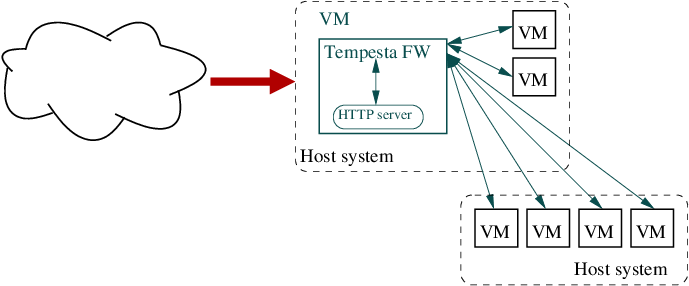
Note: Tempesta FW requires SSE 4.2 and AVX2, so ensure that the public cloud instance is running on top of appropriate hardware. Amazon EC2 uses different hardware depending on an instance type, the instance types and their hardware can be found here.
Migration🔗
A KVM virtual machine with running Tempesta FW can be migrated to other host system. Live migration can be used to minimize the downtime. See KVM migration page for more information.
Paravirtualization🔗
Probably the most famous example of paravirtualization is Xen. Whie the most Amazon EC2 instances are HVMs, there are still several paravirtualization instances, PV AMIs.
Technically you can use Tempesta FW in paravirtualized environment, either at domU or dom0 layer in terms of Xen, just the same way as for hardware virtualization case. However, Paravirtualization requires OS kernel awareness about running in paravirtualized environment, so you need to build your Linux kernel with configured paravirtualization.
Amazon EC2 PV AMI🔗
To run Tempesta FW in Amazon EC2 PV instance, you need to build Tempesta FW’s kernel according to Xen’s kernel config. Please use following guide to load the Xen guest kernel with Tempesta FW support in Amazon EC2 PV AMI.
Containers🔗
The popular examples of container virtualization are LXC (Linux Containers), OpenVZ and its commercial variant Virtuozzo.
All guest containers and the host system share the same Linux kernel, so Tempesta FW must be installed on the host system. In this case Tempesta FW can proxy ingress traffic to hosted containers, just like the private cloud case.
Kubernetes Ingress🔗
While Tempesta FW can not work inside a container, it can be used as an edge router for Kubernetes Ingress either being installed on the host system servicing the pods or on a separate node.
At the moment we don’t have an ingress controller for Tempesta FW. If you need one, then please fill an issue so that we can take it into the development scope.